
FINAL FANTASY VII REBIRTH continues Cloud Strife and his allies’ fight against the powerful Shinra Corporation. The game expands upon the events of the original and its remake, featuring a larger cast of playable characters, deeper combat systems, and a more immersive world to explore.
Change VRAM
Change the VRAM to 8GB you can learn how to do that here.
Change TDP
Change the TDP to 25-30W. You can learn how to change your TDP here.
FINAL FANTASY VII REBIRTH Legion Go Game Settings
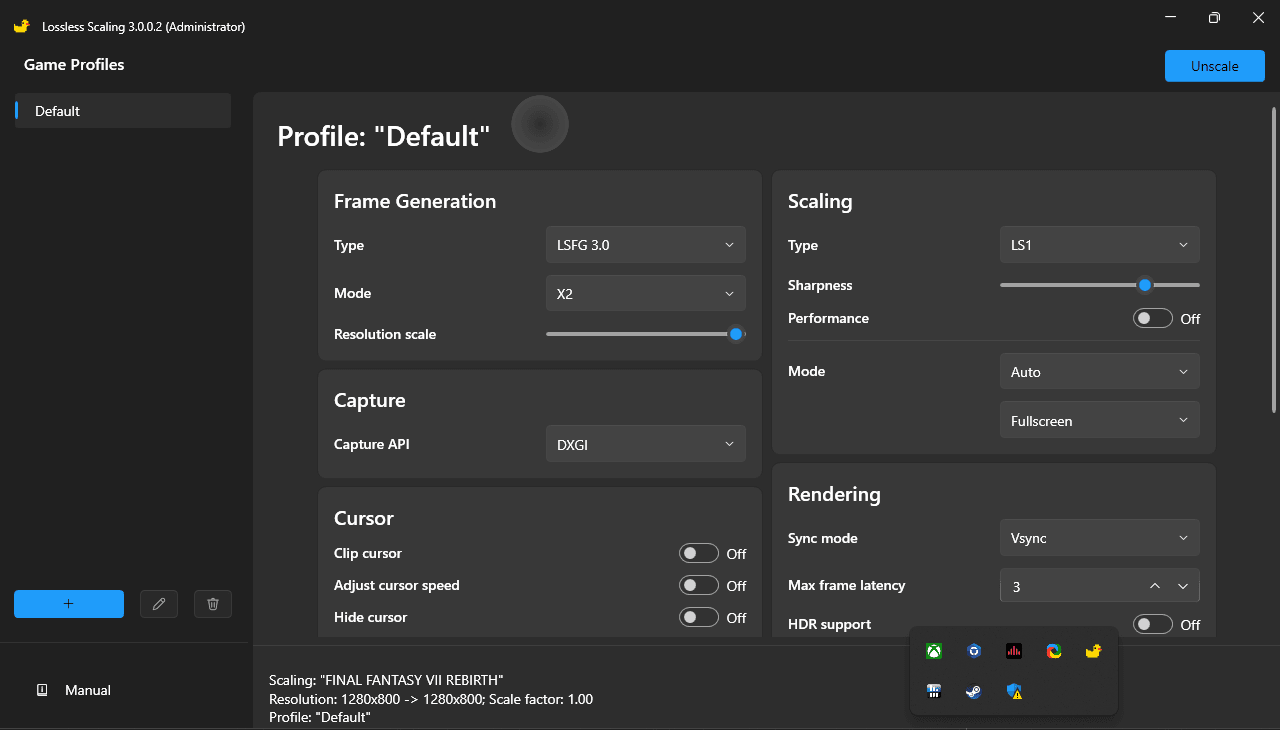
FINAL FANTASY VII REBIRTH is a very demanding game that launched with limited graphic options to help with performance on the Legion Go. Since there is no FSR 3 or Frame Generation in the game I decided to use the third party software Lossless Scaling to generate some extra frames to try to make this somewhat playable.
I set my Legion Go resolution to 800p, I locked my Legion Go FPS to 36 using RTSS, launched the game and put my recommended game settings and then enabled lossless scaling. I got a solid experience but visually the game takes a hit and there is ghosting.

Graphic Settings
 | 25/30W 800p 8GB VRAM |
Display Mode | Borderless Fullscreen |
Screen Resolution | 1280x720 |
Framerate | 120 FPS |
Display Sync Technology | V-Sync |
Dynamic Resolution Scaling (Maximum) | 100% |
Dynamic Resolution Scaling (Minimum) | 66% |
Background Model Detail | Low |
Ocean Detail | Medium |
Character Model Detail | High |
Effect Details | High |
Texture Resolution | Medium |
Shadow Quality | Low |
Fog Quality | Low |
Anti-Aliasing | TAAU |
Characters Displayed | 5 |
Characters Shadow Displayed Distance | 5 |
Low Resolution Font | Disabled |
Release Date: January 30, 2025